AI image and video tools have become familiar to everyday creators, but generating a useful three dimensional asset is a more complicated challenge.
A 3D model needs shape, geometry, textures and a format that can move into another application. Depending on the project, it may also require clean topology, animation preparation or checks for physical printing.
Meshy is designed to make the earliest stages of that process more accessible. Users can begin with a written description or reference image and generate a textured 3D model through a browser.
This review examines Meshy based on its documented features and intended workflows. It is not presented as a hands-on performance test. The aim is to clarify what the platform offers, where it may save time and which users are most likely to benefit from it.
Quick Overview
| Category | Details |
| Product type | AI-powered 3D model generation platform |
| Main inputs | Text prompts and reference images |
| Main outputs | Textured 3D models |
| Best suited for | Game prototyping, concept design, 3D printing experiments, visual content and early asset creation |
| Experience required | Beginner friendly for generation, but advanced uses may require 3D editing skills |
| Platform | Browser based |
| Export formats | FBX, OBJ, GLB, USDZ, STL, BLEND and 3MF |
| Key strengths | Fast ideation, multiple creation methods and broad workflow coverage |
| Main limitations | Results may need geometry, texture, scale or topology correction |
| Not a replacement for | CAD, engineering tools or detailed professional modelling |
What Does Meshy Do?
Meshy helps users turn an idea into an initial 3D asset without manually building every surface from the beginning.
The platform provides two primary generation methods.
Text to 3D
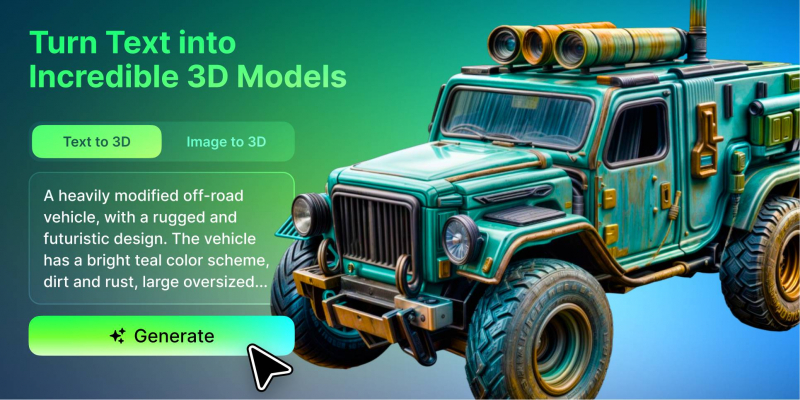
Text to 3D allows the user to describe an object in natural language.
A prompt might request a low-poly fantasy chest, a ceramic planter, a science fiction control panel or a stylised game character.
Users can add details about:
● Shape
● Material
● Colour
● Visual style
● Intended use
● Level of detail
● Character pose
The platform then interprets the prompt and produces a model that can be viewed and refined.
This method is most useful when the user has an idea but does not yet have a clear reference image.
Image to 3D
Image to 3D begins with a photograph, illustration, concept drawing or product image.
This option may provide more visual control when the appearance of the subject has already been established.
For example, an illustrator might upload a character drawing, while a product designer could begin with a concept sketch.
A single image cannot show every side of an object, so the system may need to estimate hidden areas. Results should therefore be reviewed carefully, especially when proportions and product accuracy matter.
How Accessible Is the Workflow?
One of Meshy’s strongest qualities is accessibility.
The generation process runs in a browser, so beginners do not need to install a full professional modelling package simply to test an idea.
A typical workflow may involve:
1. Entering a text prompt or uploading an image
2. Choosing relevant generation settings
3. Generating one or more variations
4. Previewing the model from different angles
5. Reviewing geometry and textures
6. Refining or remeshing the asset where necessary
7. Exporting it for the next application
The interface lowers the barrier to the first model, but it does not remove every technical stage that follows.
A beginner may be able to create an asset quickly. Using that asset in Unity, Unreal Engine, Blender, a 3D printer or an animation workflow may still require additional knowledge.
Main Features
Browser-Based 3D Generation
Meshy AI combines several 3D creation tools within an online platform.
Users can generate models, inspect results and prepare files without beginning in a traditional modelling interface.
This is useful for people who want to test a 3D idea before investing in advanced software or external production.
Low-Poly and Standard Model Options
Different projects have different geometry requirements.
A game prototype may need a lightweight object, while a visual concept may benefit from more surface detail.
Meshy provides options intended to support both lower-polygon real-time assets and more detailed models.
Users should still check the actual face count and performance inside their target application. Choosing a low-poly option does not guarantee that the model is automatically optimised for every game or mobile device.
Pose and Animation Preparation
Character generation can include pose options such as A-pose and T-pose, which are commonly used when preparing characters for rigging and animation.
Meshy also provides animation-related tools.
These features may help creators move from a static character concept toward a testable animated asset. However, important characters should still be checked for joint placement, deformation, mesh quality and animation consistency.
AI Texturing
The platform can create or update textures using AI.
This allows users to explore different surface styles without painting every material manually.
A model could be changed from polished metal to aged bronze, or from clean painted wood to a worn game-style finish.
AI texturing can accelerate experimentation, but colour accuracy, seams and material consistency may still need correction.
Built-In Model Inspection
Meshy includes tools for viewing a model, checking statistics, displaying wireframes and reviewing printability.
These controls are useful because a model can look acceptable from one angle while containing problems elsewhere.
Users should inspect:
● Hidden surfaces
● Face and vertex counts
● Texture quality
● Object orientation
● Proportions
● Broken geometry
● Printability issues
The built-in viewer supports early quality control before the model moves into another application.
Multiple Export Formats
Meshy supports common 3D formats including FBX, OBJ, GLB, USDZ, STL, BLEND and 3MF.
This makes the platform relevant to several workflows.
GLB is often useful for web-based viewing. FBX is common in game and animation pipelines. STL and 3MF are frequently used for 3D printing.
The availability of a format does not guarantee that the asset is fully prepared for its destination. Scale, texture paths, topology and orientation may still need adjustment after export.
Where Meshy Performs Best
Rapid Game Asset Prototyping
Independent game developers often need many objects before the visual direction of a project is final.
Building every crate, weapon, prop and environmental object manually can slow down early testing.
An AI 3D generator can help create provisional assets that communicate the intended style more clearly than simple cubes or generic placeholders.
The asset can be placed into a level to test:
● Scale
● Silhouette
● Placement
● Visual consistency
● Gameplay readability
Important production assets may later be refined or rebuilt by an artist. The generated version is still useful if it helps the team make a decision sooner.
Concept Design
Product designers, illustrators and creative teams can use Meshy to turn rough ideas into visible objects.
A written concept or reference drawing can become a model that is easier to review from different angles.
This is useful during early discussions, when a team wants to compare several directions before starting detailed professional work.
Meshy should not be treated as a replacement for CAD or engineering software. Generated models do not automatically contain precise measurements, tolerances or manufacturing information.
3D Printing Experiments
The platform’s support for STL and 3MF makes it relevant to 3D printing hobbyists.
Users can generate figures, decorations, tabletop objects and other creative models before preparing them for a slicer.
However, a model that looks complete on screen may still contain printing problems.
Users should check:
● Wall thickness
● Closed surfaces
● Dimensions
● Fragile details
● Overhangs
● Support requirements
● Base stability
Meshy can shorten the path to the initial shape, but printing still requires practical preparation.
Visual Content and Marketing
Marketing teams and content creators can use 3D assets to produce additional product angles, short animations, website visuals and presentation material.
This is most effective when a model can be reused across several channels.
If the model represents a real product, it must be checked carefully against the physical item. AI-generated details should not mislead customers.
Key Advantages
Faster Early Ideation
Meshy helps users reach a visible starting point quickly.
This is valuable when a team needs to compare concepts before choosing one for detailed production.
Accessible to Beginners
The browser workflow makes basic generation approachable for users without traditional modelling experience.
Multiple Creation Methods
The ability to begin with either text or images supports different creative processes.
Text is useful for open exploration. Images are useful when visual direction already exists.
Broad Export Support
The available formats allow models to continue into game, web, printing and professional editing workflows.
Useful Tools Beyond Generation
Texturing, remeshing, viewing and animation features make Meshy broader than a single-purpose generation tool.
Main Limitations
Results Are Not Always Production Ready
Generated models may contain uneven geometry, distorted hidden areas or texture inconsistencies.
The amount of cleanup depends on the complexity of the subject and its intended use.
Single Images Leave Missing Information
Images to 3D systems must estimate sides that are not visible.
This can lead to incorrect backs, handles, limbs or structural details.
Precise Dimensions Are Not Guaranteed
Meshy is not the right tool for projects that depend on exact engineering or manufacturing measurements without further professional work.
Character Quality Requires Extra Review
Faces, hands, clothing layers and accessories can be difficult for generative systems.
Characters intended for animation may need topology cleanup, rigging correction and deformation testing.
Credit-Based Generation Requires Planning
Repeated generations can consume credits quickly.
Clear prompts and well-prepared reference images can reduce unnecessary retries.
Users should review the current plan details before subscribing because included credits and features may change over time.
Who Is Meshy Best Suited For?
Meshy is likely to provide the most value to:
● Independent game developers creating prototype assets
● Small studios testing visual ideas
● Illustrators exploring characters in 3D
● Product designers producing early concept models
● 3D printing hobbyists creating starting forms
● Students and educators making visual material
● Content creators producing digital assets
● Experienced 3D artists looking to accelerate ideation
These users benefit most when speed and experimentation are more important than immediate technical perfection.
Who May Need a Different Tool?
Meshy may not be the best primary option for:
● Engineers requiring exact dimensions
● Manufacturers needing production-ready CAD files
● Architects producing regulated construction documentation
● Studios requiring perfectly controlled topology from the first output
● Teams that cannot review or edit generated models
● Projects where brand or product accuracy must be exact
In these cases, professional modelling, CAD or engineering software should remain the main production environment.
Meshy may still be useful for early visual exploration, but it should not be mistaken for the final technical system.
Is Meshy Worth Considering?
Meshy is worth considering for creators who need to move from an idea to an initial 3D model faster.
Its value is strongest during prototyping, concept development and visual experimentation.
The platform combines several useful stages, including generation, texturing, inspection, remeshing, animation preparation and export. This gives it more workflow coverage than a tool that only produces a basic mesh.
The trade-off is consistency.
Users should expect to review the output and, for demanding projects, continue working in professional software.
Beginners may find the first step easier than expected, but they should not assume that every generated asset will be ready for a game, animation, print or customer-facing campaign.
Verdict: A Strong Starting Point With Clear Boundaries
Meshy is best understood as an accessible 3D creation and prototyping platform rather than a complete replacement for professional artists or technical modelling tools.
It reduces the friction of producing a first model. That can help users test more ideas, communicate concepts earlier and decide which assets deserve further investment.
For game developers, designers, makers and visual creators, this can be a meaningful improvement to the early workflow.
For projects that require precise geometry, flawless topology or verified physical dimensions, additional tools and professional review remain necessary.
Meshy’s main strength is not that it finishes every 3D project automatically. It is that it makes the starting point available to many more people.
Post Comment
Share your thoughts about this article.
Be the first to post a comment!